Grove - Node
Grove - Node is a simple and flexible electronic module to connect physical objects. It's based on the idea of IFTTT (IF-This-Then-That). It has two Grove connectors to access a variety of Grove modules. With pre-programming IFTTT firmware, it's easy to create physical objects with analog sensors and 0/1 actuators.
It integrates Bluetooth Low Energy (BLE) which makes it extremely easy to interact with phones and tablets. To extend its usability, a DFU bootloader is built in to reprogram it Over-The-Air through BLE. It supports ARM mbed platform to write new firmware with hundreds of libraries.
Features
IFTTT pattern to use
Two Grove connectors for sensors and actuators
Plug-Play with analog sensors and high/low actuators
- Flexible 4 GPIOs, all can be used for PWM, ADC, I2C and UART
Nordic nRF51822 Multi-protocol Bluetooth® 4.0 low energy/2.4GHz RF SoC
ARM Cortex-M0 processor
- 256kB flash, 16kB RAM
On board battery charge circuit
OTA firmware
mbed enabled
Online IDE
Easy to use C/C++ SDK
Handy libraries
Specifications
Operating voltage: 3.3Vdc
Battery capacity: 80mAH
Maximum charge current: 100mA
Grove Interface supply Voltage:3.3V
Grove Interface supply Current: 100mA max
Grove Interface input Voltage:0~3.3V
Pinout
Get Started
- Turn On Grove Node
Connect Grove Node with a battery or a USB cable and then press its button, it will run.
Double Clicks - run its bootloader, the red LED will be on.
Otherwise - run its application, the green LED will blink.
- Turn Off Grove Node
In bootloader mode - wait for a while to run into the application.
In application mode - long press the button wait until all LEDs are off
Get Started with Pre-programmed Firmware
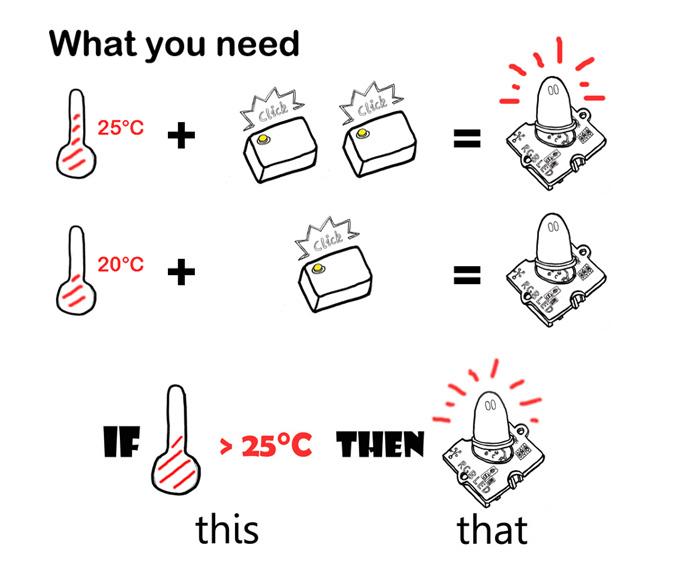
First, we need an Input Grove module to sense the physical world. Pre-programmed firmware only supports an analog input sensor or 0/1 digital input sensor. The following Grove modules from Seeedstudio can be used as an Input:
| Module name | Parameter to measure | ||
|---|---|---|---|
| Grove - 80cm Infrared Proximity Sensor | Distance | ||
| Grove - Button | On/Off | ||
| Grove - Electricity Sensor | Electricity | ||
| Grove - Gas Sensor(MQ2&MQ5) | Gas Quality | ||
| Grove - Light Sensor | Light | ||
| Grove - Magnetic Switch | Magnetic | ||
| Grove - Moisture Sensor | Moisture | ||
| Grove - PIR Motion Sensor | PIR Motion | ||
| Grove - Rotary Angle Sensor | Rotary Angle | ||
| Grove - Tilt Switch | Object Position | ||
| Grove - Sound Sensor | Sound | ||
| Grove - Temperature Sensor | Temperature | ||
| Grove - Touch Sensor | Human touch | ||
| Grove - Water Sensor | Water | ||
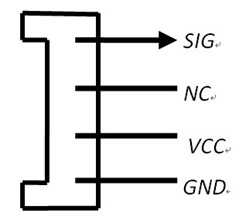
Other analog sensors which is not Grove-compatible need a little small adjustment. Just connect your signal output to pin4 of Grove connector and then the VCC and GND. Note that only sensors that output an analog or digital 1/0 value can be used with the pre-programmed firmware
Second, we need an output Grove module as an actuator. The following Grove modules can be used:
| Module name | Action when triggered | ||
|---|---|---|---|
| Grove - Buzzer | Buzzer enabled | ||
| Grove - LED | LED On | ||
| Grove - Vibrator | Vibrate | ||
| Grove - Relay | Swith On/Off other circuits | ||
For example, we intend to create a light which automatically turns on if the environment is dark and turns off if otherwise, then we select a Grove-Light_Sensor and a Grove-Red_LED.
Third, teach the Grove Node a logic.
Connect the light sensor as an input and the LED as an output, and then turn on the Grove Node.
In a normal environment, do a single-click on the Grove Node's button
Cover the light sensor with a hand to simulate a dark environment, and then do a double-clicks, the Grove - LED will be on.
Release the light sensor, the Grove - LED will be off.
Over-The-Air
The Grove Node has a pre-programmed OTA bootloader. To run into the bootloader:
power off the Grove Node
do a double-clicks on the Grove Node's button
the red LED will be on and a BLE device named SD7DFU can be scaned
use nRF Master Control Panel to upgrade the BLE app

More information can be found at mbed.org.
Develop New Application
See ble on mbed.org
Schematic Online Viewer
Resources
Tech Support
Please submit any technical issue into our forum.